 Call us+91 90337 85404
Sign in
Start free
Find export buyers from real shipment records
Eximium's buyer discovery tool finds the companies already importing your product, by HS code or product name, with their shipment history and current suppliers, then hands them to the Outreach CRM.
Find Export Buyers is Eximium's buyer discovery tool. Search by product or HS code and it returns the companies that actually imported that product, with their shipment history, countries and current suppliers.
Updated · Included in every Eximium plan, including the free Starter plan.
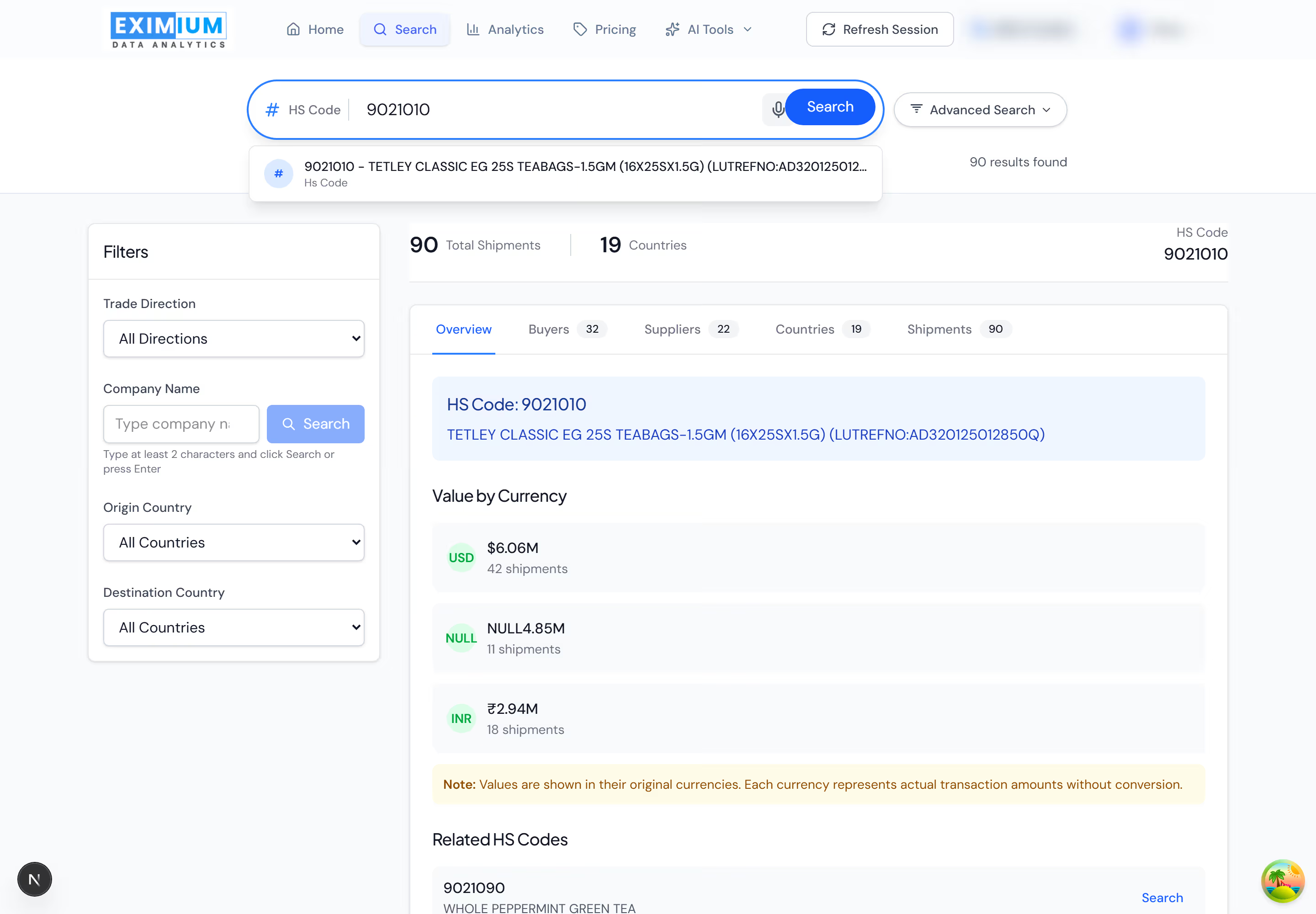
Most exporters find buyers by waiting: a marketplace listing, a fair once a year, a forwarded enquiry. Find Export Buyers turns the question around. Every shipment that clears a port leaves a record of who imported what from whom, and those records say exactly which companies are buying your product right now. The tool reads them so you can.
Who is Find Export Buyers for?
For any Indian exporter or manufacturer with a product that already crosses borders under an HS code: fabric and garment mills, chemical producers, engineering workshops, food processors, handicraft exporters and the merchant exporters who serve them. It is built for the owner or export manager who has a product and a price and needs the names, not for analysts who want to model global trade flows.
If you are new to exporting, it also answers the first question, which country is actually buying this, before you spend money on a market.
How does buyer discovery from shipment data work?
- Search by product or HS code. Type "polyester greige fabric" or the six-digit code 5407. The HS code guide explains how to confirm yours.
- Read the importers. The result is a list of companies that imported that product, with their country, how many shipments they received and when the last one arrived.
- Look at their suppliers. For each importer you see which companies and countries supply them today. A buyer sourcing from China or Vietnam at your quality is an open door; a buyer with three Indian suppliers is a harder but well-informed one.
- Qualify and save. Shortlist the buyers whose frequency, volume and supplier mix fit you. The buyer-finding guide has a qualification checklist.
- Hand them to outreach. Saved buyers move into the Outreach CRM, where the AI researches the contact, writes the first message in the buyer's language and follows up on schedule.
What do you see for each buyer?
- Company name, city and country.
- Shipment count and the dates of the first and most recent shipment in the data.
- Product descriptions as declared on the manifests, which tell you the grade and construction they buy.
- Current suppliers and the supplier's country.
- Ports and, where published, quantities and weights.
Everything is organised around one decision: is this a company I should write to this week?
How is this different from a buyer database or a directory?
A directory lists companies that describe themselves as importers. Shipment data lists companies that imported. The difference is the thousands of trading names that never actually bought anything, and the active importers that never registered in any directory. A purchased database is also frozen on the day it was compiled; shipment records keep arriving, so the list you search next month includes the buyer who started importing last week.
Find Export Buyers is also tied to the rest of Eximium. A found buyer is one click from an outreach sequence, a quotation and, later, the documents for the shipment, all under the same login as your B2B marketplace listing.
What happens after you find a buyer?
The tool stops at the shortlist on purpose; the Outreach CRM takes over. It finds the buyer's sourcing contact, writes a short opener that names the product and what the buyer already imports, sends follow-ups on a schedule you control, and scores the replies so you call the hottest leads first. Your job is the sample, the quotation and the relationship.
Which markets and products does it cover?
Coverage follows the countries that publish customs or bill-of-lading data, and it is broadest for the United States and Latin America, with Indian export records showing which foreign companies already buy from India in every product group. Any product that ships under an HS code is searchable; the richest results come for goods that move in regular containers, such as textiles, chemicals, metals, machinery parts, food and agricultural commodities. Search your own product to see current coverage for your markets.
How much does it cost?
Find Export Buyers is included in every Eximium plan. The free Starter plan comes with a monthly quota of searches, and the Growth and Pro plans raise the quota and add team seats. There is no separate licence for the tool, and no lock-in; current limits and prices are on the pricing page.
What results should you expect?
Treat it as a weekly routine, not a one-time search. Exporters who pull a fresh importer list for one or two target markets each week, qualify twenty names and run the outreach sequence build a pipeline within a quarter. The data gives you the names; the discipline gives you the orders.
Questions exporters ask
Is this a buyer database I download?
No. It is a live search of shipment records. You search a product or HS code, read the importers that match, qualify them and save the ones worth contacting. There is no stale list to buy.
Which countries are covered?
Coverage follows the markets whose customs or shipping data is published, including the United States and much of Latin America, plus Indian export records that show which foreign buyers already import from India. Search your own product to see the markets with data today.
Do I get the buyer's email or phone?
The records show the company, its location, its shipments and its suppliers. Eximium adds the contact research and the first message inside the Outreach CRM, so the handover from a found buyer to a sent email is one click.
Can I try it before paying?
Yes. The Starter plan is free and includes a quota of buyer searches; the Growth and Pro plans raise the limits.